
YouTube is the world’s second-largest search engine after Google, processing more than 3.7 billion searches per month. With over 500 hours of video uploaded every minute, gathering structured data from YouTube search results can provide powerful insights for content creators, marketers, and researchers. Whether you’re analyzing keywords, tracking trends, building datasets, or monitoring competitors, scraping YouTube search results allows you to transform the endless stream of video content into actionable intelligence.
This guide explains what data you can gather, the different scraping methods available, and ethical & legal considerations.
What You Can Extract From YouTube Search Results
YouTube search results contain much more than video titles. A single query can reveal metadata such as the video’s upload date, view count, thumbnail URL, description snippets, channel name, and video ID. Many search results display enhanced elements including Shorts, livestreams, playlists, and recommendation panels tied to trending topics. In some cases, channel badges, subscriber counts, or topic tags may appear directly in results.
This rich metadata makes YouTube search scraping essential for understanding which types of videos succeed, how ranking behaves for specific niches, and what elements competitive content relies on. Researchers analyzing misinformation, academic trends, or public sentiment also use YouTube search data to build structured datasets.
Why People Scrape YouTube Search Results
One of the biggest applications of YouTube scraping is YouTube SEO (YtSEO). By examining the top-ranking videos for a keyword, creators can identify patterns in title structure, thumbnail design, word choices, emoji usage, and video length. Scraping allows creators to benchmark against competitors, identify content gaps, and determine keyword difficulty.
Trend watchers use scraped results to track new topics gaining momentum, while businesses analyze market interest in their verticals. Data scientists use search results as raw material for NLP projects—studying trends in video descriptions, cluster signals, identification of keyword groups, or engagement prediction models.
How to Scrape YouTube Search Results
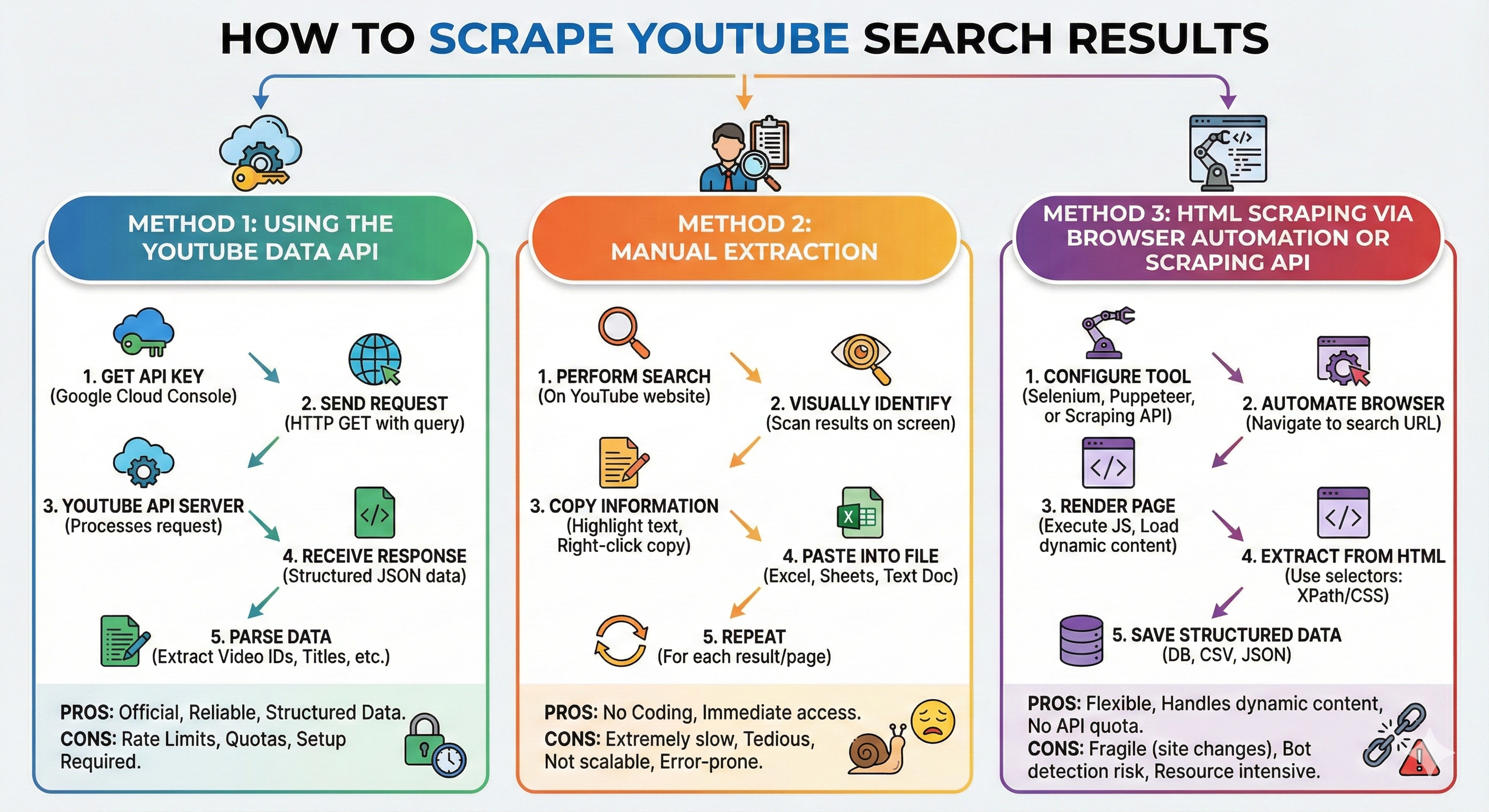
There are three main ways to scrape YouTube search results, each suited to different technical skills and goals.
Many users start with the YouTube Data API v3, which is the most compliant method. It returns structured JSON containing search results, video metadata, channel information, and statistics like views and durations. The API uses quotas and requires an API key, but for most tasks, it provides everything needed without any page scraping.
For small tasks or one-off analyses, manual extraction is possible by copying from YouTube search results directly. Though tedious, it works for qualitative or small dataset needs.
For deeper extraction or high-volume research, developers turn to headless browser automation or utilize Scraping API such as Decodo. These tools simulate a real browser, load YouTube’s dynamic JavaScript, and extract the rendered content—including dynamic sections like Shorts or infinite scroll results. This method requires the most care to avoid violating rate limits or triggering CAPTCHAs.
Method 1: Using the YouTube Data API
The YouTube API provides the cleanest path to scraping structured search results. You begin by creating a Google Cloud project and enabling the YouTube Data API v3, then generating an API key. Next, you use the search endpoint to query for videos and retrieve basic metadata such as titles, descriptions, video IDs, and channel names.
Because the search endpoint limits fields such as view counts, a second call to the videos endpoint is typically required. This call returns full metadata, including view count, like count, published date, and video duration. After retrieving results, the data can be stored as JSON or CSV and analyzed using your preferred tools. Many creators combine API-based scraping with spreadsheet tools or dashboards to evaluate keyword competitiveness.
Method 2: Manual Extraction
Manually extracting YouTube search results is the easiest and safest approach for small datasets or quick research, and it doesn’t require any scripting, APIs, or special tools. Begin by going to YouTube and entering your search query in the search bar. Once the results load, scroll slowly through the page to ensure all visible results are rendered. YouTube loads content dynamically, so scrolling helps retrieve more listings.
Once YouTube search results are rendered, you can manually copy the information you need, such as video titles, channel names, view counts, thumbnails, upload dates, and URLs. Hovering over a video title or right-clicking it enables you to copy the exact video link. If you need structured data, paste the information into a spreadsheet or note-taking tool and organize it into columns like Title, Channel, URL, Views, and Description Snippet. This method works best for small-scale analysis or quick competitive research, allowing you to capture the essential metadata without relying on automation or scraping tools.
Method 3: HTML Scraping via Browser Automation or Scraping API
Tools like headless browsers (Puppeteer, Playwright) or Web Scraping APIs fetch and render the actual search page HTML. You then parse this HTML with libraries like Cheerio in Node.js. This approach can see exactly what a user’s browser sees, including layout quirks, but is brittle (selectors break when YouTube changes its UI) and must be used carefully under YouTube’s ToS.
Decodo’s Web Scraping API is a managed scraping solution that handles proxies, JavaScript rendering, CAPTCHAs, and anti-bot measures for you. It supports real-time scraping via a POST endpoint at:
https://scraper-api.decodo.com/v2/scrape
You authenticate with a username and password, then send JSON parameters such as url or query (depending on the target template). The API can return HTML, JSON, CSV, or even Markdown, especially when using the “Advanced” plan.
For YouTube search results, the simplest approach is:
- Build a YouTube search URL like https://www.youtube.com/results?search_query=your+keyword.
- Send that URL to Decodo’s Scraping API so they fetch and render it.
- Parse the returned HTML in Node.js to extract video cards, titles, channels, links, etc.
Because YouTube’s HTML structure changes from time to time, you should treat the selectors in the example below as starting points, not as guaranteed long-term solutions.
Best Practices for Responsible Scraping
To avoid problems, scrapers should use caching so that repeated queries do not overwhelm YouTube. Randomized delays and proper user-agent strings help reduce bot detection when using browser automations like Puppeteer. Storing only publicly visible metadata is critical, as scraping private or sensitive information violates YouTube policy. Above all, use scraping ethically, with minimal intrusion, and within reasonable limits.
Challenges and Limitations
Scraping YouTube is not always straightforward. YouTube’s interface changes frequently, meaning scrapers may break when UI elements are updated. Regional or language variants can produce different results for identical searches. Automated behavior may trigger anti-bot safeguards or CAPTCHA walls, requiring cautious rate limiting and realistic browsing patterns.
API quotas also limit how much data can be retrieved in a given period. Furthermore, human-centered elements such as video descriptions or thumbnails may contain unexpected formatting that complicates parsing.
Legal and Ethical Considerations
Before scraping YouTube, it’s important to understand the platform’s Terms of Service, which restrict unauthorized automated extraction of certain data. YouTube prohibits scraping that attempts to bypass access controls, gather personal data, or violate rate limits. Practically speaking, this means:
- Never scrape private or unlisted videos
- Avoid sending high-frequency automated requests
- Only extract publicly visible metadata
- Prefer the official YouTube Data API when possible
Scraping is permitted only when done responsibly, ethically, and without violating YouTube’s systems or user privacy.
Conclusion
Scraping YouTube search results provides a powerful way to turn YouTube’s vast public data into insights. Whether you’re researching competitors, analyzing keyword difficulty, building datasets, or tracking trends, this process can reveal patterns that drive growth and content performance. By choosing the right method, including YouTube API, manual extraction or browser automation; you gain the tools to build meaningful datasets securely and ethically.
Images generated by Google Gemini.
Share this post
Leave a comment
All comments are moderated. Spammy and bot submitted comments are deleted. Please submit the comments that are helpful to others, and we'll approve your comments. A comment that includes outbound link will only be approved if the content is relevant to the topic, and has some value to our readers.
Comments (0)
No comment